

Dyness-Wechselrichter
Wichtig
Wichtig
Derzeit ist bei der Integration von C&I-Schränken mit MPPT der maximale SOC auf 95 % begrenzt, damit PV weiterhin die Last versorgen kann.
Unterstützte Geräte
| Device Type | Variants | Modbus TCP (Ethernet) | RS485 | Curtailment |
|---|---|---|---|---|
| DH100F | 71~100kWh | ✅ | ✅ | ✅ |
| DH200F | 100kW/215kWh | |||
| DH200Y | 100kW/232kWh | |||
| LS | ||||
| HT-A | ||||
| DH800Y | ⚠️ this feature has yet to be tested |
Verkabelung
Der a-TroniX Controller und die Dyness-Wechselrichter kommunizieren über RS485 oder Ethernet.
Ethernet
Für eine korrekte Ethernet-Verkabelung: Befolgen Sie die Richtlinien für die Ethernet-Verkabelung.
RS485
Info
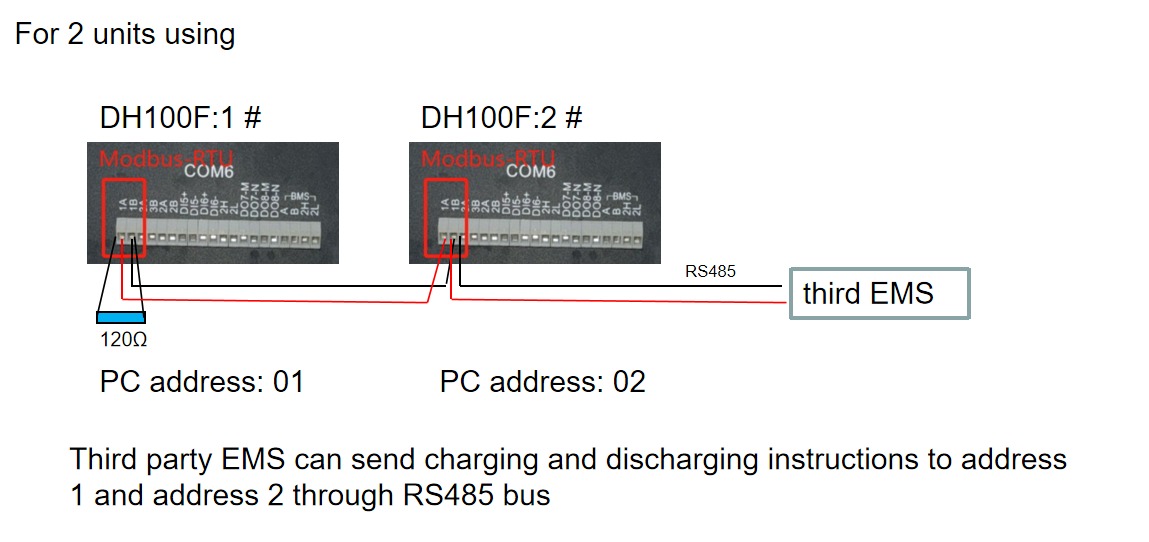
RS485 Wiring
- For correct RS485 wiring: Follow the guidelines for RS485 wiring.
- If the wiring shown in the table below is incorrect, please let us know.
- There is no general consensus in the industry about the usage of A and B for the RS485 polarity, so it may be counterintuitive and opposite of what you might expect for some devices.
| Device | a-TroniX Controller model OM1 | a-TroniX Controller model IG8 | RS485-USB converter | RS485-Ethernet converter |
|---|---|---|---|---|
| COM6 terminal 1A | RS485 A | RS485_POS | RS485 A | TX+ |
| Com6 terminal 1B | RS485 B | RS485_NEG | RS485 B | TX- |
| N/A | RS GND | GND | Not available | G |
Konfiguration
DH100F
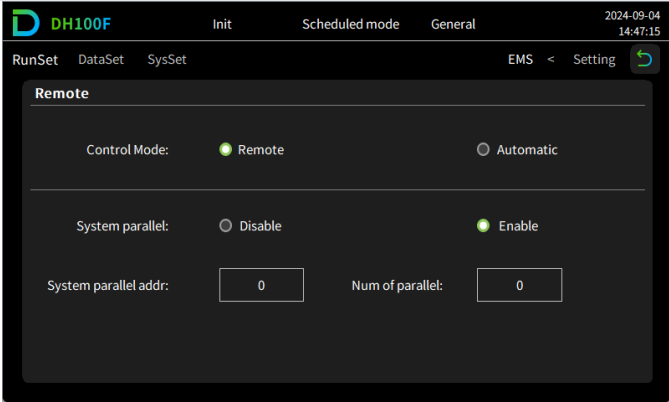
Der Dyness DH100F muss auf den Fernsteuerungsmodus eingestellt werden:
- Klicken Sie auf das Symbol für das Hauptmenü in der oberen rechten Ecke der Hauptoberfläche.
- Klicken Sie in der Hauptmenüleiste auf "Data".
- Klicken Sie in der Untermenüleiste auf "EMS".
- Klicken Sie oben links in der Navigationsleiste auf "RunSet".
- Stellen Sie den Steuermodus auf "Remote".
Warnung
NOTE: RS485 Device Addresses
- You MUST give each device on the RS485 bus a unique address. Check the manual of the device on how to do this.
- Use lower addresses first (1, 2, ...) because the a-TroniX Controller will find them faster!
- For each device, it is generally recommended to stick with the factory default baud rate, parity, and stop bits. The a-TroniX Controller will scan on those first.
Last updated August 24, 2026Edit this page