

Wallbox EV Charging Stations
Supported Devices
| Device Type | Variants | Cloud API | Modbus TCP (Ethernet) | RS485 |
|---|---|---|---|---|
| Pulsar | Plus/Max/Pro | ✅ | ❌ | ❌ |
| eM4 | All | |||
| Quasar 2 | ||||
| Commander | ||||
| Copper SB | ||||
| Supernova | ❌ | ✅ |
Connection
The communication between the a-TroniX Controller and the Wallbox EV Charging Stations is established through API and Modbus TCP. No physical cables are required to the a-TroniX Controller.
Settings
Pulsar | eM4 | Quasar 2
No additional settings have to be made on the Wallbox side.
Supernova
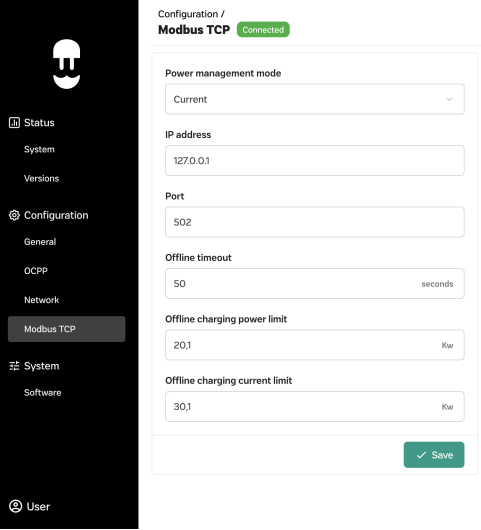
- Open the WebManager of the Supernova
- Go to "Configuration" > "Modbus TCP"
- Set the "Power Management Mode" to "Current"
- Set a static IP address for the Supernova
- Set the "Port" to "502"
- Save the settings
Last updated December 10, 2025Edit this page