
a-TroniX logo
a-TroniX logo
Accessories
AppCertificates
Configuration from A to Z
Control response timeController
Customer Specific
Devices
Boiler
Cloud
Energy Meter
Ev Charging Station
a-TroniXABBAlfenAlpitronicAmtronAutelBlitz-PowerEaseeEnovatesEtrelEVChargeKingFLEXeCHARGEGo-eHuawei SChargerIlumenKempowerMyEnergi EV Charging StationsNexBlueOCPPPeblar EV Charging StationsRaedianSchneider ElectricSiemensSMASofarTeltonika EV Charging StationsTriathlonVolt-TimeVoolWallbox EV Charging StationsXargeon / ZhongDe EnergyZaptec
Gas Meter
Heat Pump
New integrations
Plc
Pv Hybrid And Battery Inverters
Switched Loads
Water Meter
External Signals
InstallationLicenseNetworkQuick StartSafety, maintenance and legal noticesSpecificationsStatus LEDs
Troubleshooting
Wiring & connectivity guidelines
DevicesEv Charging Station
Peblar

Peblar EV Charging Stations

Supported Devices

Device TypeModbus TCP (Ethernet)RS485
Peblar Home✅❌
Peblar Home Plus
Peblar Business

Connection

The communication between the a-TroniX Controller and the Peblar EV Chargers operates via Modbus TCP.

Settings
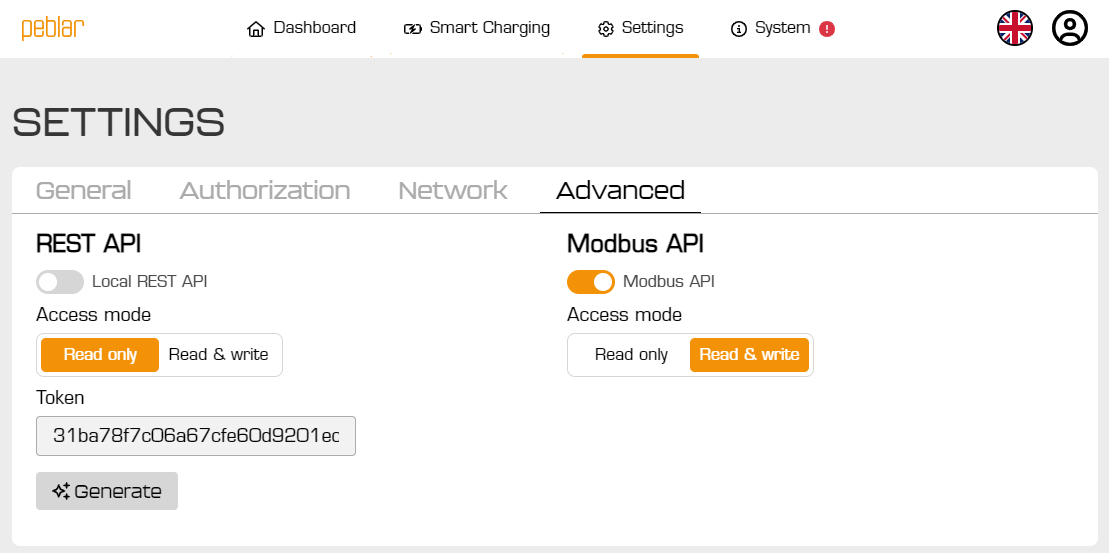
Peblar Settings

The Peblar EV Chargers need to have modbus enabled:

  1. Open the chargers web interface
  2. Navigate to "Settings" -> "Advanced"
  3. Enable "Modbus API"
  4. Set the "Access mode" to "Read & write"
Last updated December 10, 2025Edit this page

OCPP

Previous Page

Raedian

Next Page

On this page

Peblar EV Charging StationsSupported DevicesConnectionSettings