
Selbst konfigurierter Energiezähler (*spezielle Supportbedingungen gelten)
Wenn Ihr Energiezähler konfigurierbare Modbus-Adressen hat (oder wenn Ihr Energiezähler nicht in der Liste der unterstützten Geräte enthalten ist), stellen wir eine Funktion bereit, mit der Sie einen Energiezähler selbst konfigurieren können. Dieser Prozess ermöglicht es Ihnen, den Energiezähler als Modbus-Slave einzurichten, sodass er mit dem a-TroniX Controller kommunizieren kann.
Vorsicht
WARNUNG: Es gelten spezielle Supportbedingungen: *Bitte beachten Sie, dass diese Funktion „wie besehen“ bereitgestellt wird und auf eigenes Risiko verwendet werden sollte. Falls Probleme auftreten oder Sie individuelle Unterstützung benötigen, helfen wir Ihnen gerne im Rahmen eines Supportvertrags. Kontaktieren Sie sales@smartgridone.com, um Preise und Verfügbarkeit zu erfragen.
Schritt 1
Verbinden Sie den Zähler über RS485 oder Modbus TCP mit dem a-TroniX Controller.
- Für Modbus-TCP-Ethernet: Befolgen Sie bitte die Richtlinien für die Ethernet-Verkabelung. Für eine korrekte Ethernet-Verkabelung:
- Für RS485: Befolgen Sie bitte die Richtlinien für die RS485-Verkabelung
Prüfen Sie außerdem im Handbuch Ihres Zählers die korrekten Angaben zur Verkabelung und zum Anschluss und prüfen Sie, ob Einstellungen geändert werden müssen, um die Modbus-Kommunikation zu aktivieren.
Schritt 2
Erfassen Sie die folgenden Informationen von Ihrem Energiezähler:
- Modbus-Adresse: Die Adresse des Energiezählers am RS485-Bus.
- Baudrate: Die Kommunikationsgeschwindigkeit des Energiezählers (z. B. 9600, 19200 usw.).
- Parität: Die Paritätseinstellung des Energiezählers (z. B. None, Even, Odd).
- Registerinformationen: Für jede Messung, die Sie auslesen möchten, benötigen Sie:
- Registeradresse (dezimal)
- Datentyp (z. B. int16, uint32, float32)
- Wortreihenfolge (falls für Werte mit mehreren Registern zutreffend)
- Einen erforderlichen Skalierungsfaktor oder Offset
- Den Typ der Messung (z. B. Spannung, Strom, Leistung)
Schritt 3
Öffnen Sie die Weboberfläche des a-TroniX Controller und navigieren Sie zum Konfigurationsbereich des Energiezählers. Suchen Sie anschließend den Treiber „Generic“:
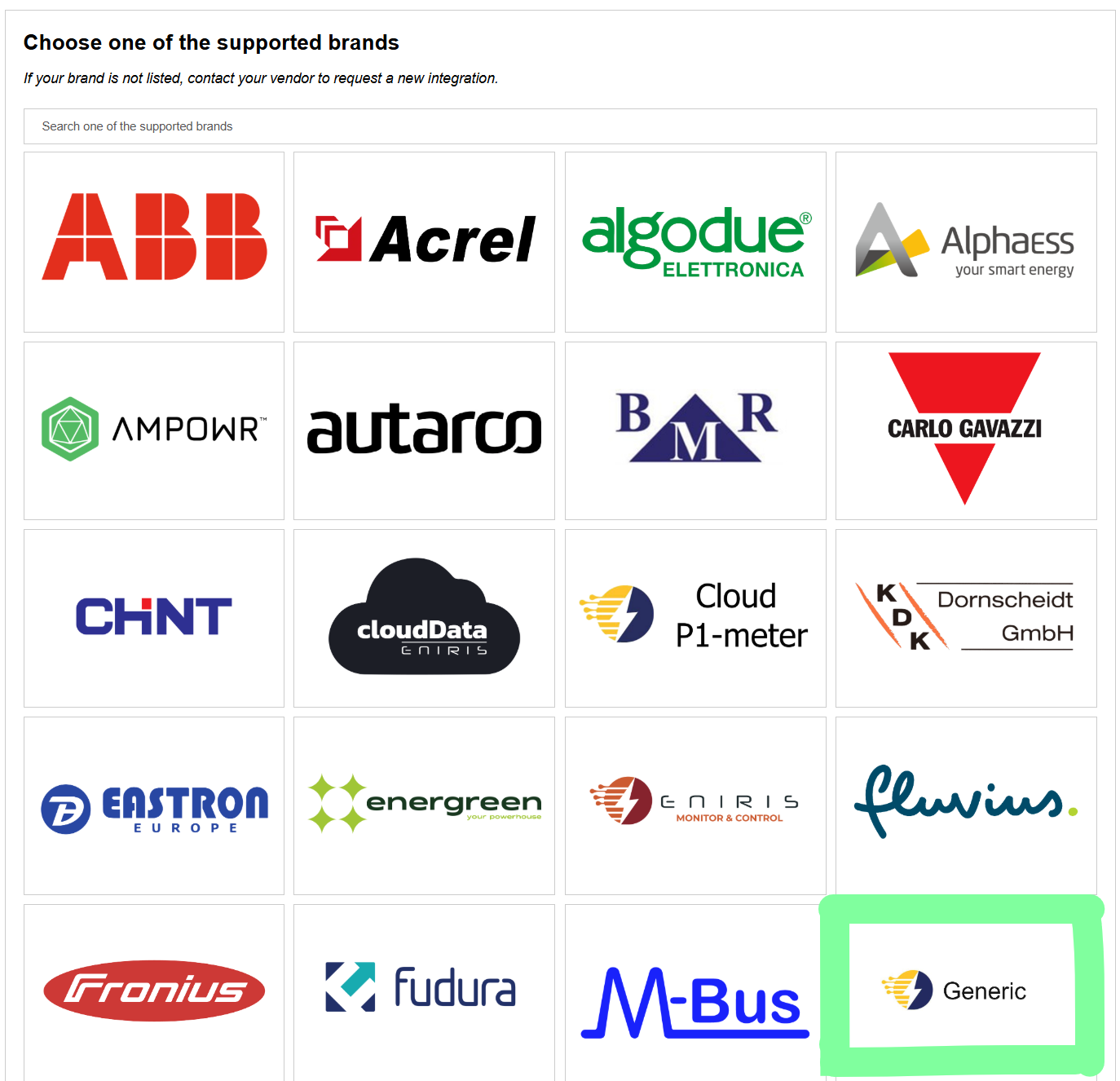
Wählen Sie die Schnittstelle aus, die Sie verwenden möchten (RS485 oder Modbus TCP).
Schritt 4:
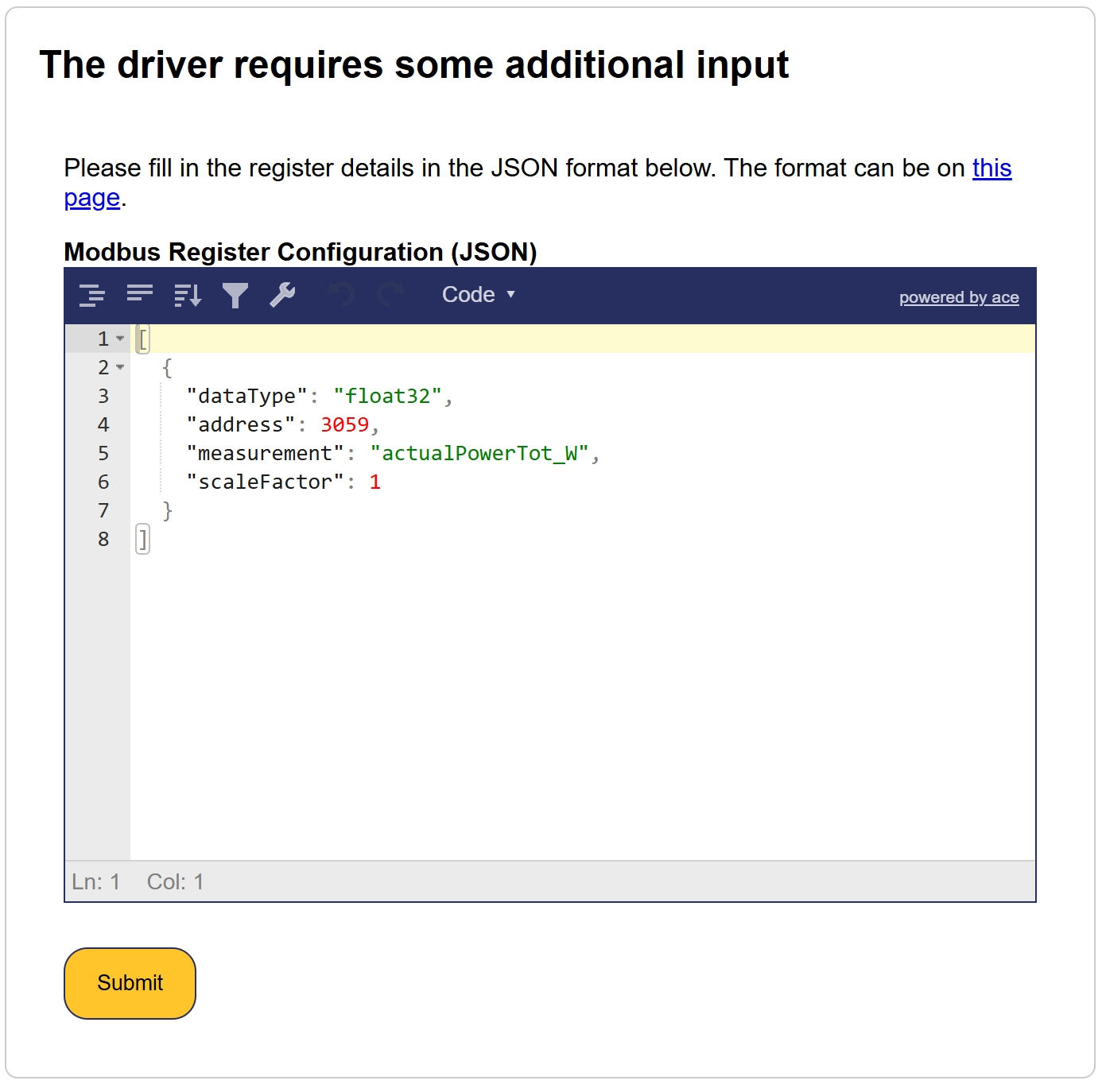
Sie müssen eine JSON-Konfiguration bereitstellen, die festlegt, welche Register ausgelesen und wie sie interpretiert werden sollen. Die Konfiguration folgt dieser Struktur:
[
  {
    "dataType": "float32",
    "address": 3000,
    "wordOrder": "bigEndian",
    "scaleFactor": 1,
    "measurement": "actualPowerTot_W"
  },
  {
    "dataType": "uint32",
    "address": 3002,
    "wordOrder": "bigEndian",
    "scaleFactor": 0.1,
    "measurement": "importedAbsEnergyTot_Wh"
  }
]
Jede Registerkonfiguration erfordert:
dataType: Der Datentyp der im Register gespeicherten Daten (z. B. "int16", "uint32", "float32")address: Die Modbus-Registeradresse in Dezimalschreibweisemeasurement: Der standardisierte Messname (z. B. "actualPowerTot_W", "importedAbsEnergyTot_Wh")
Optionale Felder sind:
wordOrder: Die Reihenfolge von Werten mit mehreren Registern ("bigEndian", "littleEndian", "middleEndian", "reverseWord")scaleFactor: Wert, mit dem der Rohwert des Registers multipliziert wird (Standard: 1)offset: Wert, der nach der Skalierung addiert wird (Standard: 0)bytePosition: Position innerhalb eines Byte-Arrays (falls zutreffend)enumMapping: Ordnet bei Enum-Typen Werte Zeichenfolgen zulength: Anzahl der Elemente bei Arrays oder Byte-Feldernsigned: Gibt bei numerischen Typen an, ob der Wert vorzeichenbehaftet ist
Wir empfehlen dringend, mindestens Folgendes aufzunehmen:
- Gesamtleistung (
actualPowerTot_W) - Insgesamt importierte Energie (
importedAbsEnergyTot_Wh) - Insgesamt exportierte Energie (
exportedAbsEnergyTot_Wh) bei bidirektionaler Messung
Geben Sie den Code an dieser Stelle ein:
Ich sehe einen Fehler
Die Eingabe wird strikt validiert und akzeptiert keinerlei Fehler:
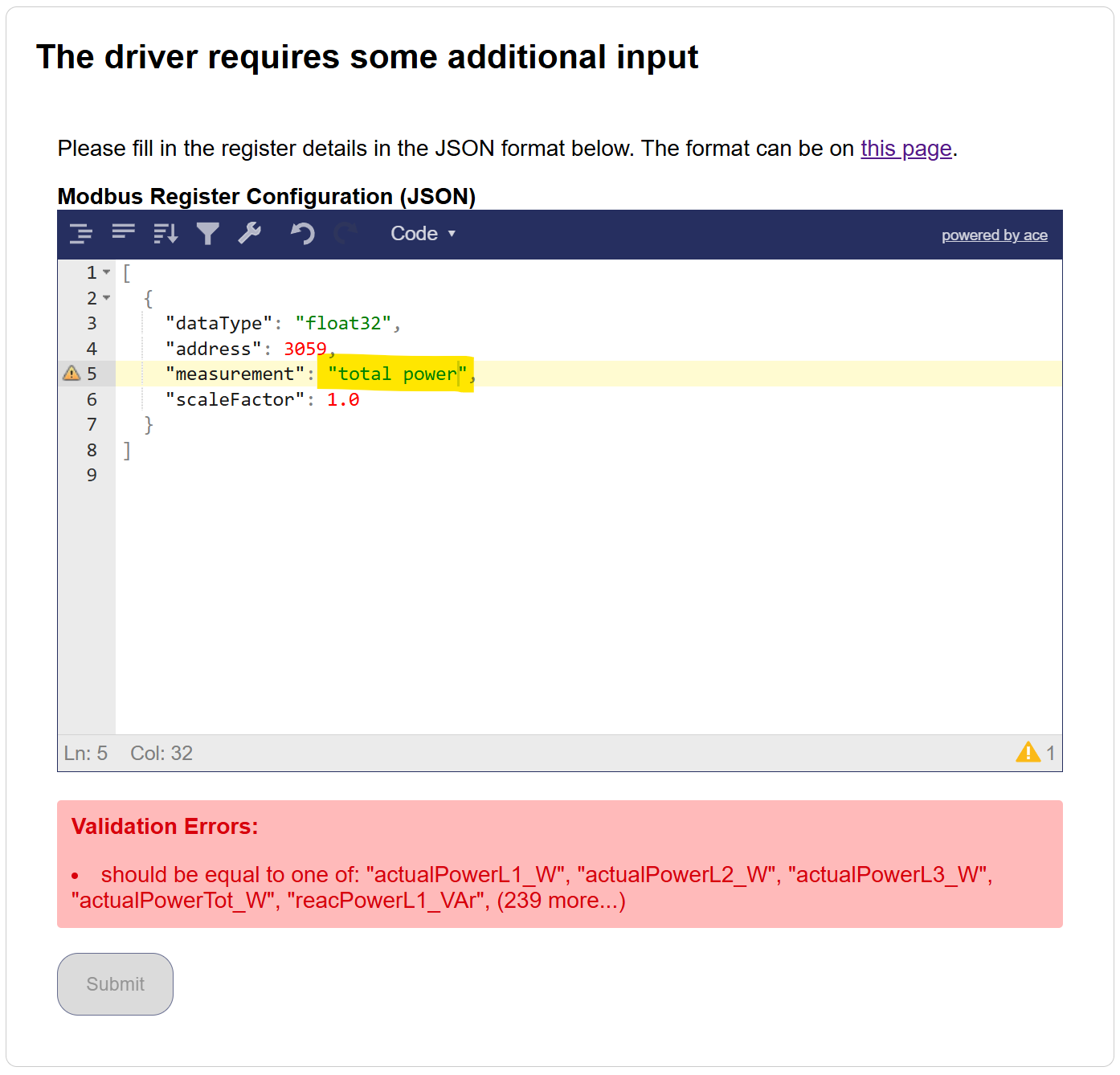
Das obige Beispiel wird nicht akzeptiert, weil der Benutzer total power statt actualPowerTot_W ausgewählt hat.
Die folgenden Messungen werden akzeptiert:
actualPowerL1_W
actualPowerL2_W
actualPowerL3_W
actualPowerTot_W
reacPowerL1_VAr
reacPowerL2_VAr
reacPowerL3_VAr
reacPowerTot_VAr
importedAbsEnergyL1_Wh
importedAbsEnergyL2_Wh
importedAbsEnergyL3_Wh
importedAbsEnergyTot_Wh
importedEnergyTodayTot_Wh
importedAbsReacEnergyL1_VArh
importedAbsReacEnergyL2_VArh
importedAbsReacEnergyL3_VArh
importedAbsReacEnergyTot_VArh
importedEnergyDeltaTot_Wh
grossImportedEnergyDeltaTot_Wh
importedReacEnergyDeltaL1_VArh
importedReacEnergyDeltaL2_VArh
importedReacEnergyDeltaL3_VArh
importedReacEnergyDeltaTot_VArh
exportedAbsEnergyL1_Wh
exportedAbsEnergyL2_Wh
exportedAbsEnergyL3_Wh
exportedAbsEnergyTot_Wh
exportedEnergyTodayTot_Wh
exportedAbsReacEnergyL1_VArh
exportedAbsReacEnergyL2_VArh
exportedAbsReacEnergyL3_VArh
exportedAbsReacEnergyTot_VArh
exportedEnergyDeltaL1_Wh
exportedEnergyDeltaL2_Wh
exportedEnergyDeltaL3_Wh
exportedEnergyDeltaTot_Wh
grossExportedEnergyDeltaTot_Wh
exportedReacEnergyDeltaL1_VArh
exportedReacEnergyDeltaL2_VArh
exportedReacEnergyDeltaL3_VArh
exportedReacEnergyDeltaTot_VArh
producedAbsEnergyL1_Wh
producedAbsEnergyL2_Wh
producedAbsEnergyL3_Wh
producedAbsEnergyTot_Wh
producedAbsReacEnergyTot_VArh
consumedAbsEnergyL1_Wh
consumedAbsEnergyL2_Wh
consumedAbsEnergyL3_Wh
consumedAbsEnergyTot_Wh
consumedEnergyTodayTot_Wh
consumedAbsReacEnergyTot_VArh
producedEnergyDeltaTot_Wh
consumedEnergyDeltaTot_Wh
producedEnergyTodayTot_Wh
chargedAbsEnergyTot_Wh
chargedEnergyTodayTot_Wh
chargedEnergyDeltaTot_Wh
dischargedAbsEnergyTot_Wh
dischargedEnergyTodayTot_Wh
dischargedEnergyDeltaTot_Wh
childrenProducedEnergyDeltaTot_Wh
childrenConsumedEnergyDeltaTot_Wh
childrenLoadsPower_W
childrenLoadsImpEnergyDeltaTot_Wh
childrenLoadsExpEnergyDeltaTot_Wh
childrenOtherPower_W
childrenOtherImpEnergyDeltaTot_Wh
childrenOtherExpEnergyDeltaTot_Wh
childrenUnmeasPower_W
childrenUnmeasImpEnergyDeltaTot_Wh
childrenUnmeasExpEnergyDeltaTot_Wh
childrenProducedPower_W
childrenConsumedPower_W
childrenStoragePower_W
childrenEVPower_W
childrenHVACPower_W
autoconsumedEnergyDeltaTot_Wh
producedExpEnergyDeltaTot_Wh
childrenStorageChargedEnergyDeltaTot_Wh
childrenStorageDischargedEnergyDeltaTot_Wh
childrenStorageSolarChargeEnergyDeltaTot_Wh
childrenStorageGridChargeEnergyDeltaTot_Wh
childrenStorageSolarDischargeEnergyDeltaTot_Wh
childrenStorageGridDischargeEnergyDeltaTot_Wh
childrenEVChargeEnergyDeltaTot_Wh
childrenHVACEnergyDeltaTot_Wh
currentL1_A
currentL2_A
currentL3_A
currentN_A
currentLAvg_A
voltageL1N_V
voltageL2N_V
voltageL3N_V
voltageLNAvg_V
voltageL1L2_V
voltageL2L3_V
voltageL3L1_V
voltageLLAvg_V
frequency_Hz
powerFactorTot
powerFactorL1
powerFactorL2
powerFactorL3
voltageDCBus_V
voltageInput1_V
currentInput1_A
powerInput1_W
voltageInput2_V
currentInput2_A
powerInput2_W
voltageInput3_V
currentInput3_A
powerInput3_W
voltageInput4_V
currentInput4_A
powerInput4_W
voltageInput5_V
currentInput5_A
powerInput5_W
voltageInput6_V
currentInput6_A
powerInput6_W
voltageInput7_V
currentInput7_A
powerInput7_W
voltageInput8_V
currentInput8_A
powerInput8_W
voltageInput9_V
currentInput9_A
powerInput9_W
voltageInput10_V
currentInput10_A
powerInput10_W
voltageDC_V
currentDC_A
voltageInputA_V
currentInputA_A
powerInputA_W
voltageInputA1_V
currentInputA1_A
powerInputA1_W
voltageInputA2_V
currentInputA2_A
powerInputA2_W
voltageInputA3_V
currentInputA3_A
powerInputA3_W
voltageInputA4_V
currentInputA4_A
powerInputA4_W
voltageInputA5_V
currentInputA5_A
powerInputA5_W
voltageInputA6_V
currentInputA6_A
powerInputA6_W
voltageInputB_V
currentInputB_A
powerInputB_W
voltageInputB1_V
currentInputB1_A
powerInputB1_W
voltageInputB2_V
currentInputB2_A
powerInputB2_W
voltageInputB3_V
currentInputB3_A
powerInputB3_W
voltageInputB4_V
currentInputB4_A
powerInputB4_W
voltageInputB5_V
currentInputB5_A
powerInputB5_W
voltageInputB6_V
currentInputB6_A
powerInputB6_W
currentInputTot_A
voltageInputAvg_V
powerInputTot_W
cabinetTemp_degC
ambientTemp_degC
heatSinkTemp_degC
isolationResistance_kOhm
runTimeTot_s
status
statusMsg
workingMode
operationMode
heatingAbsEnergy_Wh
heatingAbsVolume_m3
flowRate_m3ph
thermalPower_W
departureLineTemp_degC
returnLineTemp_degC
chargedAbsSessionEnergyTot_Wh
sessionDuration_s
chargingSessionId
evNumOfPhases
evUsedPhases
evTargetACChargeCurrent_A
evRequiringCharge
remainingEnergy_Wh
batteryVoltage_V
batteryCurrent_A
batteryPower_W
batteryTemp_degC
batteryOperationMode
PVOperationMode
gridOperationMode
current_A
consumedEnergy_Ah
stateOfCharge_frac
powerSetpoint_W
minStateOfCharge_frac
stateOfHealth_frac
storedEnergy_Wh
absVolume_m3
volumeDelta_m3
flow_m3ps
absPulseCount
pulseCountDelta
pulseRate_ph
flow1_m3ps
flow2_m3ps
flow3_m3ps
flow4_m3ps
flow5_m3ps
flow6_m3ps
flow7_m3ps
flow8_m3ps
flow9_m3ps
flow1_Lps
flow2_Lps
flow3_Lps
flow4_Lps
flow5_Lps
flow6_Lps
flow7_Lps
flow8_Lps
flow9_Lps
Schritt 5
Speichern Sie die Konfiguration, nachdem Sie die erforderlichen Informationen eingegeben haben. Der a-TroniX Controller wird nun versuchen, mit den bereitgestellten Einstellungen mit dem Energiezähler zu kommunizieren.
Tipp
Für eine bessere Übersicht können Sie Ihre JSON-Konfiguration zunächst in einem Texteditor erstellen und anschließend in das Konfigurationsfeld einfügen. Dadurch lassen sich die Struktur vor der Anwendung leichter bearbeiten und validieren.