

Tesvolt
Supported Devices
| Device Type | Modbus TCP (Ethernet) | RS485 | Curtailment |
|---|---|---|---|
| Energy Manager | ✅ | ❌ | ✅ |
Wiring
The communication between the a-TroniX Controller and the Tesvolt system operates via Modbus TCP. For correct ethernet wiring: Follow the the guidelines for ethernet wiring.
Energy Manager
Tesvolt Energy Manager Configuration
| Steps |
|---|
| 1a. Open the Tesvolt Energy Manager web interface. Request the link to the portal, and its login credentials from your installer |
1b. Go to Remote Control Signals under Device Settings and press Configure a Remote Control Signal:  |
1c. Configure the device with the correct IP address(Listen Address) and slave address(Unit ID) and press Save:  |
Troubleshooting
Inside the Tesvolt Energy manager web interface, it's possible to check the signals that are sent by the a-TroniX Controller to the Tesvolt Energy Manager. It can be reached using this way:
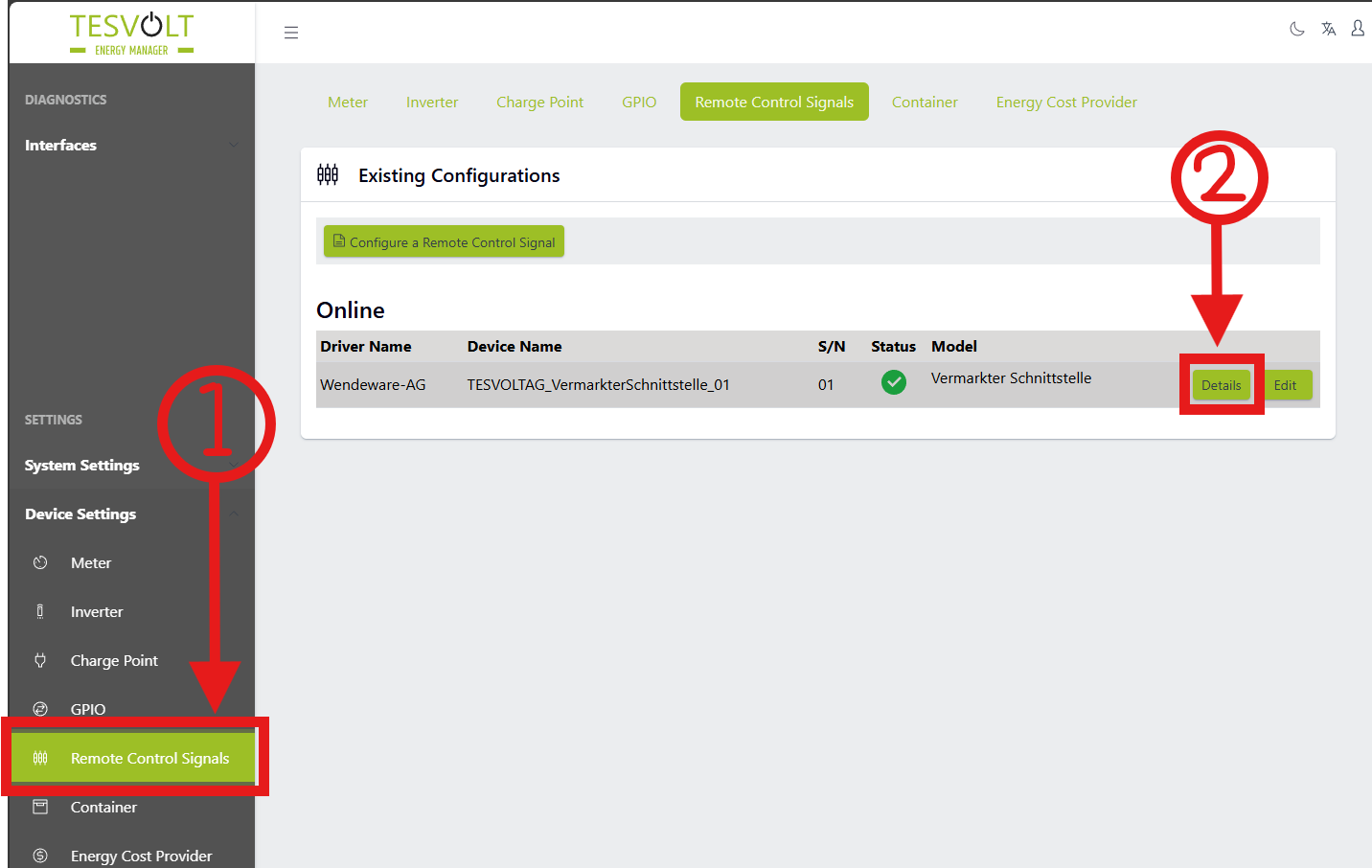
PV control issues:
If any issues occur related to PV control, check if the following value corresponds with the value set by the controller:

Battery control issues:
If any issues occur related to battery control, check if the following value corresponds with the value set by the controller:

Last updated March 10, 2026Edit this page