
TODO: يبدو أن هذا ينطبق على المزيد من العواكس؟

عواكس Sofar TL-G3 و TLM/X-G3 السلسلة
الأجهزة المدعومة
| Device Type | Modbus TCP (Ethernet) | RS485 | Curtailment |
|---|---|---|---|
| ... | ✅ | ✅ | ✅ |
تحذير
تحذير
- معظم الأجهزة يمكنها التواصل باستخدام مودباص TCP. هذا غير صالح لسلسلة "SOFAR 1...40KTL"
- بعض العواكس تتطلب برنامج تشغيل محدد ومقتصر على موزعين معينين. استشر موزعك في حالة الشك.
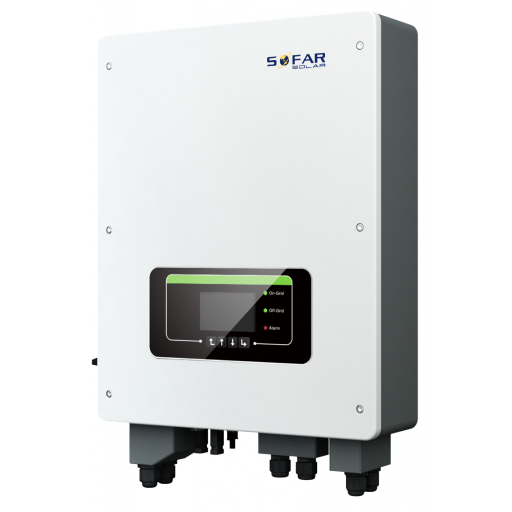
التوصيلات الكهربائية
إيثرنت
قم بتوصيل العاكس بشبكة الإنترنت الخاصة بك باستخدام "SOFAR SOLAR ETHERNET STICK LSE3".
للتوصيل الصحيح باستخدام إيثرنت: اتبع .
RS485
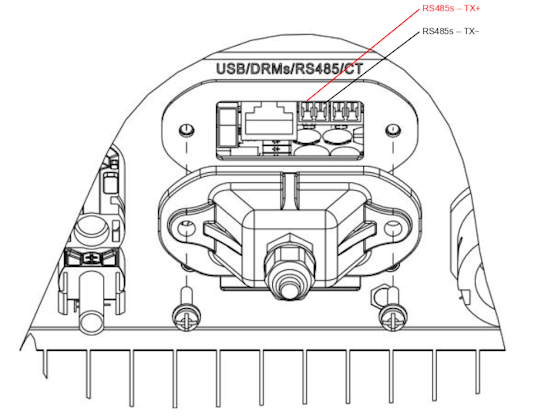
...TL-G3 & G1 & G2
معلومات
RS485 Wiring
- For correct RS485 wiring: Follow the guidelines for RS485 wiring.
- If the wiring shown in the table below is incorrect, please let us know.
- There is no general consensus in the industry about the usage of A and B for the RS485 polarity, so it may be counterintuitive and opposite of what you might expect for some devices.
| Device | a-TroniX Controller model OM1 | a-TroniX Controller model IG8 | RS485-USB converter | RS485-Ethernet converter |
|---|---|---|---|---|
| RS485s TR+ | RS485 A | RS485_POS | RS485 A | TX+ |
| RS485s TR- | RS485 B | RS485_NEG | RS485 B | TX- |
| N/A | RS GND | GND | Not available | G |
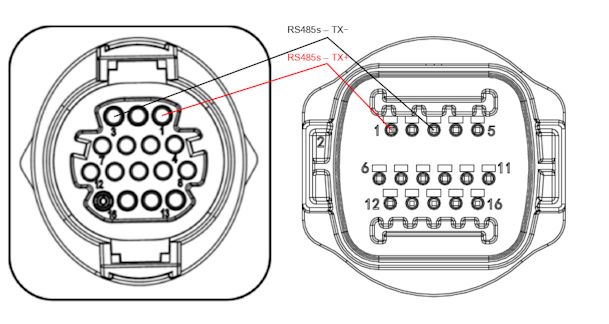
...TLX & TLM
معلومات
RS485 Wiring
- For correct RS485 wiring: Follow the guidelines for RS485 wiring.
- If the wiring shown in the table below is incorrect, please let us know.
- There is no general consensus in the industry about the usage of A and B for the RS485 polarity, so it may be counterintuitive and opposite of what you might expect for some devices.
| Device | a-TroniX Controller model OM1 | a-TroniX Controller model IG8 | RS485-USB converter | RS485-Ethernet converter |
|---|---|---|---|---|
| RS485s TR+ (pin 1) | RS485 A | RS485_POS | RS485 A | TX+ |
| RS485s TR- (pin 3) | RS485 B | RS485_NEG | RS485 B | TX- |
| N/A | RS GND | GND | Not available | G |
التهيئة
RS485
تحذير
NOTE: RS485 Device Addresses
- You MUST give each device on the RS485 bus a unique address. Check the manual of the device on how to do this.
- Use lower addresses first (1, 2, ...) because the a-TroniX Controller will find them faster!
- For each device, it is generally recommended to stick with the factory default baud rate, parity, and stop bits. The a-TroniX Controller will scan on those first.
يجب تفعيل التحكم الخارجي في العاكس من خلال قائمة التهيئة في شاشة LCD الخاصة بالعاكس.
- اضغط ضغطة قصيرة على الزر للأسفل.
- سترى "1. إدخال الإعدادات"، اضغط مع الاستمرار على الزر للأسفل لمدة ثانيتين للدخول إلى الإعدادات.
- تصفح الإعدادات حتى ترى:
- عنوان Modbus أو
- تعيين بروتوكول الاتصال (Set ComProtocol)
- اضغط مع الاستمرار على الزر للأسفل لمدة ثانيتين لتعيين العنوان.
- قم بتعيين العنوان إلى القيمة المطلوبة.