

محولات Dyness
مهم
مهم
حاليًا، التكامل يدعم حتى حد شحن بنسبة 95%. وذلك لأنه عند تجاوز حالة الشحن 95%، قد يتوقف البطارية عن الاستجابة لنقاط الضبط بسبب إجراءات نظام إدارة البطارية.
نحن نعمل على حل هذه المشكلة مع Dyness وشركاء آخرين.
الأجهزة المدعومة
| Device Type | Variants | Modbus TCP (Ethernet) | RS485 | Curtailment |
|---|---|---|---|---|
| EC100 | 100kWh | ✅ | ✅ | ✅ |
| DH100F | 71~100kWh | |||
| DH200F | 100kW/215kWh | |||
| DH200Y | 100kW/232kWh | ❌ |
الأسلاك
يتواصل a-TroniX Controller مع محولات Dyness عبر RS485 أو إيثرنت.
إيثرنت
للتوصيل الصحيح بكابل الإيثرنت: اتبع .
RS485
معلومات
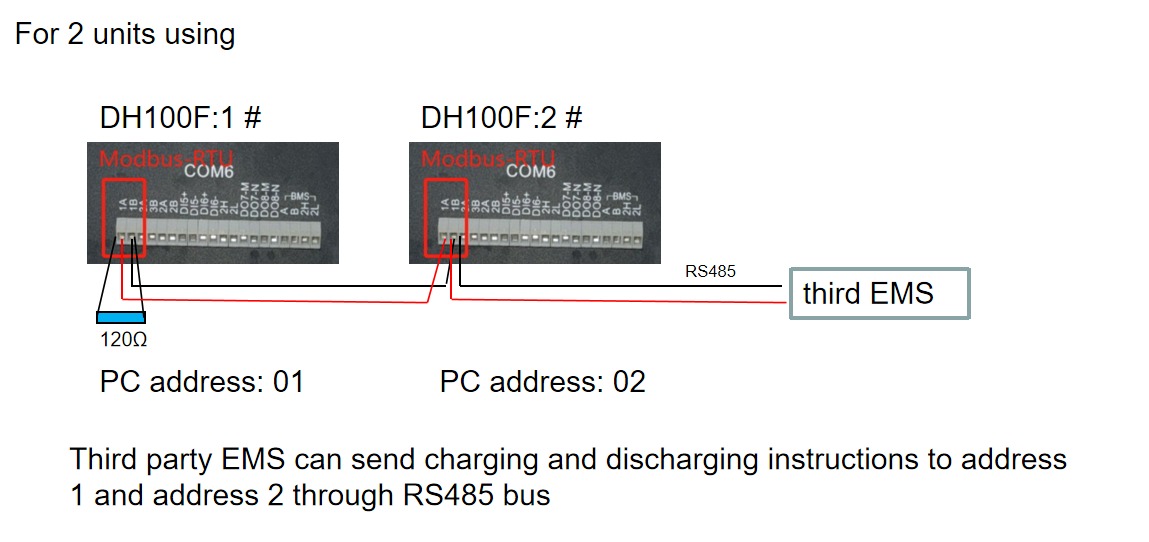
RS485 Wiring
- For correct RS485 wiring: Follow the guidelines for RS485 wiring.
- If the wiring shown in the table below is incorrect, please let us know.
- There is no general consensus in the industry about the usage of A and B for the RS485 polarity, so it may be counterintuitive and opposite of what you might expect for some devices.
| Device | a-TroniX Controller model OM1 | a-TroniX Controller model IG8 | RS485-USB converter | RS485-Ethernet converter |
|---|---|---|---|---|
| COM6 terminal 1A | RS485 A | RS485_POS | RS485 A | TX+ |
| Com6 terminal 1B | RS485 B | RS485_NEG | RS485 B | TX- |
| N/A | RS GND | GND | Not available | G |
الإعداد
DH100F
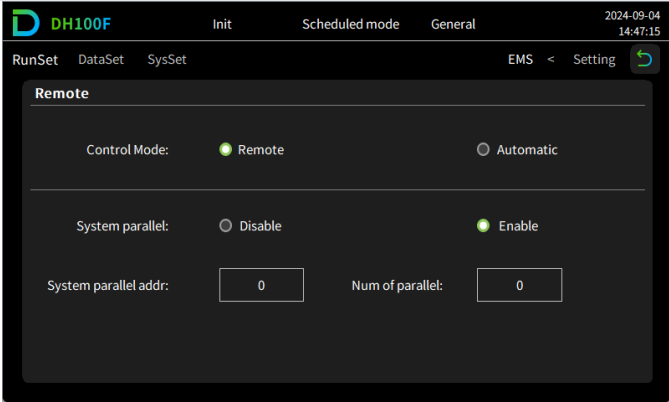
تحتاج محولات Dyness DH100F إلى الضبط على وضع التحكم عن بُعد:
- انقر على أيقونة القائمة الرئيسية في الزاوية العلوية اليمنى من الواجهة الرئيسية
- انقر على "البيانات" في شريط القائمة الرئيسي
- انقر على "EMS" في شريط القائمة الفرعي
- انقر على "RunSet" في أعلى يسار شريط التنقل
- اضبط وضع التحكم إلى "عن بُعد"
تحذير
NOTE: RS485 Device Addresses
- You MUST give each device on the RS485 bus a unique address. Check the manual of the device on how to do this.
- Use lower addresses first (1, 2, ...) because the a-TroniX Controller will find them faster!
- For each device, it is generally recommended to stick with the factory default baud rate, parity, and stop bits. The a-TroniX Controller will scan on those first.